Webflow & Claude: Future of Web Building
As of February 2026, the Webflow and Claude connector has officially moved from experimental "vibe coding" to a first-party powerhouse.


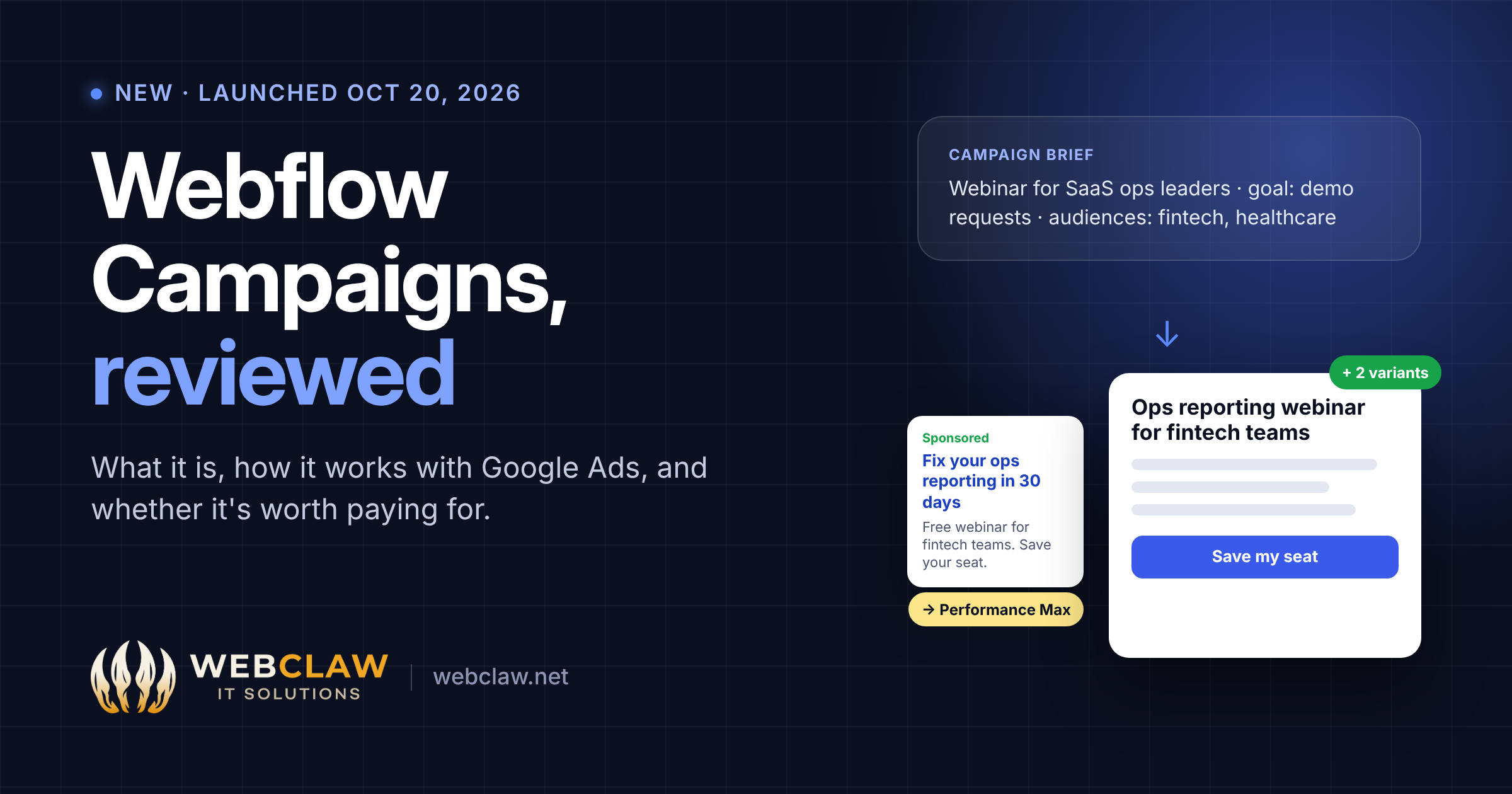
On October 20, 2026, Webflow launched Campaigns, a standalone tool that uses AI agents to turn a campaign brief into on-brand landing pages, audience variations and matching ads. It can then set up a Performance Max campaign and send it to Google Ads. It works alongside any website, not just Webflow sites.
I've managed Google Ads accounts for more than five years and built Webflow landing pages for most of that time, so this launch sits right where our work happens. Here's what Campaigns does, how the Google Ads side works, and an honest view of who should pay for it.
Campaigns is built for demand generation, growth and performance marketing teams who need to launch landing pages for paid ads, webinars, events and account-based marketing without waiting for the web team. Webflow describes it as working "alongside any CMS".
It is not a full website builder, and it is not a replacement for a Google Ads specialist. It speeds up building and launching. The strategy, targeting, budgets and optimization still need someone who knows paid search.
Campaigns reads your website and builds a brand design system. You then write the campaign brief with an AI agent, covering goals, audiences and messaging. You can paste rough ideas, upload a finished brief, or start from a draft.
From that brief, it generates a conversion-focused landing page, audience variations (by persona, industry or even a single target account, each on its own URL), and ads in multiple sizes and formats with matching copy. You edit everything in a visual editor, with the AI Assistant, or through AI tools like Claude and ChatGPT via Webflow's MCP.
Connect HubSpot or Marketo forms so leads go straight into your existing workflows and conversions are tracked from day one. Publish pages to your subdomain, then build a Performance Max campaign and push it to Google Ads.
Built-in reporting shows sessions, conversions, account-level engagement and pipeline influence. With HubSpot or Salesforce connected, you can see which campaigns produced pipeline. AI recommendations then suggest what to improve.
Webflow's launch post quotes Exiger, whose team used to prototype pages in Lovable and rebuild them in WordPress. They now do both steps in Campaigns, with the analytics next to the page.
According to Webflow, Campaigns lets you build and launch Performance Max campaigns inside Webflow and push them to Google Ads, with ad copy matched to each landing page. It builds on the "Google Ads for Webflow" integration that Webflow and Google announced in January 2026, which runs Performance Max across Search, YouTube, Display, Discover, Gmail and Maps.
Webflow hasn't published the details of the handoff. Before you rely on it, ask in your demo:
Faster launches are useful, but Performance Max is a specific kind of campaign, and it isn't always the right one. From running Google Ads accounts, here's what matters:
For more on what makes paid traffic convert, see our Google Ads landing pages service.
There are three common ways to build landing pages for paid ads. Here's how they compare:
For many teams, landing pages built on their existing Webflow site are still the most cost-effective option. They use components the team already owns and live on the main domain. Our Webflow pricing guide covers what that setup costs, including the Optimize add-on.
Campaigns is available to buy now, but Webflow hasn't published a price. To get one, you book a demo through the Campaigns page.
Two things suggest how it's positioned:
We'll update this section once public pricing appears.
It depends on how many campaigns you run and who builds them today.
Campaigns solves a real problem: the slow handoff between brief, design, development and ad setup. For teams with volume, that speed is worth paying for. But AI-generated pages and Performance Max both reward good inputs: a sharp brief, a clear offer and clean conversion data. The tool makes launching faster; it doesn't make strategy optional.
Webflow Campaigns is a standalone AI tool, launched on October 20, 2026, that turns a campaign brief into on-brand landing pages, audience variations and matching ads. It also launches Performance Max campaigns in Google Ads and reports on conversions and pipeline.
No. Campaigns works alongside any CMS, including WordPress. It reads your brand from your existing site and publishes landing pages to a subdomain you choose.
Webflow hasn't published pricing. Campaigns is sold through sales, so you need to book a demo for a quote. It's separate from Webflow's site and Workspace plans.
Yes. You can build Performance Max campaigns inside Campaigns and push them to Google Ads, with ad copy matched to each landing page. Webflow hasn't confirmed support for standard Search campaigns.
At launch it connects to HubSpot and Marketo forms, and to HubSpot and Salesforce for pipeline reporting.
Yes. Through Webflow's MCP server, compatible AI tools such as Claude and ChatGPT can build and edit campaign pages. You can also use Campaigns' own visual editor and AI Assistant.
No. Optimize is a Webflow site add-on for A/B testing and personalization. Campaigns is a separate product for creating and launching campaign pages and ads.
We build high-converting Webflow landing pages for paid traffic, and we've managed Google Ads for more than five years. We can tell you whether Campaigns fits your volume, or whether well-built pages on your own site, connected to HubSpot, will do the job for less. (If you go that route, our Webflow + HubSpot guide shows the setup.)
Talk to us → · Hire a Webflow developer →