Webflow Maintenance Checklist: What to Check Monthly
A practical monthly Webflow maintenance checklist to keep your website secure, fast, functional and SEO-friendly.


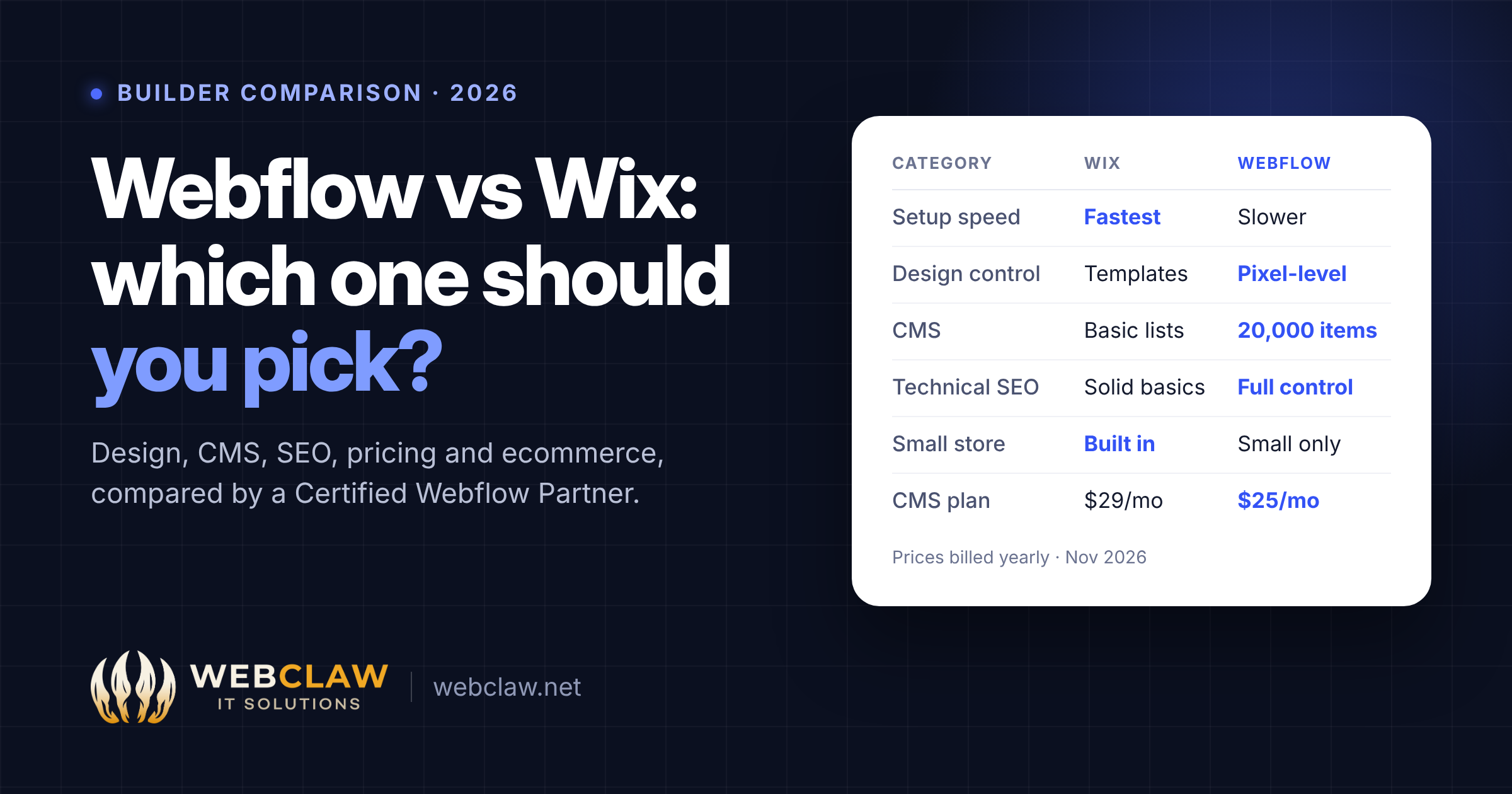
Pick Wix if you need a site live this week, you'll run it yourself, and you want bookings, a small store or a menu without hiring anyone. Pick Webflow if your site is a growth channel: you publish content, run ads to landing pages, care about technical SEO, or plan to hand the site to a marketing team.
Both builders changed a lot in 2026. Wix launched its AI builder Wix Harmony in January and Studio Two for professionals on November 2. Webflow merged its CMS and Business plans into a single Premium plan in May and switched off the Legacy Editor in October.
We're a Certified Webflow Partner, so we're biased toward Webflow. We'll still tell you when Wix is the better call, because for plenty of small businesses it is.
Wix is built for speed. You start from a template, or a prompt in Wix Harmony, then drag sections into place. Aria, Wix's AI agent, can restyle a page, change the palette or add a store from a chat box. Most owners have a decent-looking site in a day.
Webflow is built for control. Every element has a class, every layout is real flexbox or grid, and responsive breakpoints behave like hand-written CSS. That's why designers like it. It's also why first-timers find it slow: you're learning web design, not just filling a template.
Wix Studio, and now Studio Two, close some of that gap for agencies. Studio Two adds an infinite canvas, variables and React code export. Webflow still leads for teams that want a reusable component system. At WebClaw we build every site on Finsweet's Client-First system, so class names stay readable and any future developer can pick the project up.
Verdict: Wix for speed, Webflow for a design that matches a Figma file exactly.
Webflow's CMS is the main reason marketing teams switch. You design one template for a collection (blog posts, case studies, team members, locations), and every item inherits it. Collections can reference each other, so a case study can pull in its industry, its service and its author automatically. Webflow's Premium plan includes 20,000 CMS items.
Wix's CMS works well for simple lists, but limits are tighter on the cheaper plans. Wix's help centre lists 1,500 items on Light, 4,000 on Core, 20,000 on Business and up to 10 million on Business Elite. Dynamic pages are possible, though building multi-reference layouts takes more workarounds.
If you plan to publish 2–4 posts a month, build programmatic landing pages, or run a resource library, Webflow's CMS will save you time every week.
Verdict: Webflow, clearly, for content-led sites.
Wix's old reputation for poor SEO is out of date. Today it gives you editable meta tags, clean URLs, an auto-generated sitemap, structured data for its own apps and a guided SEO setup checklist. For a local business targeting "plumber in Austin", Wix is perfectly capable.
Webflow wins once SEO becomes a channel you actively work on:
Verdict: A tie for a basic local site. Webflow for anyone competing on content or technical SEO. If you want help with that side, see our Webflow SEO services.
On sticker price the two are close. The real difference is what each plan unlocks.
Webflow adds Workspace seats on top if a team builds in the Designer. Clients who only edit content don't need a full seat. Our Webflow pricing breakdown explains seats and plans in detail.
What it really costs: Hosting is the small part. A custom-designed Webflow site built by an agency costs far more upfront than a DIY Wix site, and that's the real comparison to make. Pay for Webflow when your site has to bring in leads. Stay on Wix when "good enough and live" is the goal.
Wix is the stronger ecommerce choice for most small sellers. Core and above handle products, payments, abandoned-cart emails and multichannel selling. Wix also has native apps for bookings, restaurants, events and memberships that Webflow simply doesn't match.
Webflow Ecommerce gives you full design control over product and checkout pages, which suits brands with a small, design-led catalogue. It's less suited to large inventories, complex variants or subscriptions.
When a brand needs both a high-end marketing site and serious commerce, we usually pair Webflow with Shopify. Our guide to connecting Webflow and Shopify shows five ways to do it.
Verdict: Wix for a small store or bookings. Webflow for a handful of hero products. Webflow plus Shopify for a real catalogue.
Both platforms host your site for you, with SSL, a global CDN and no servers to manage. Wix advertises 99.99% uptime. Webflow hosting runs on a global CDN with automatic SSL and one-click backups and restores.
The speed difference comes from how each one builds pages. Wix loads its own app framework on every page, so heavy templates can feel slow on mobile. Webflow publishes mostly static HTML and CSS, so a well-built page tends to score better on Core Web Vitals. A badly built Webflow site can still be slow, though. Huge images, too many interactions and stacked third-party scripts slow any platform down.
Verdict: Webflow has the edge, as long as the build is clean. Connecting your domain is simple on both. Here's our Webflow DNS guide if you're moving one.
Editing day to day. In Wix, the person who built the site and the person who updates it use the same editor, which is simple but risky: anyone can break the layout. Webflow separates the two. Editors change text, images and CMS items on the canvas, while the design stays locked. Since the Legacy Editor was switched off on October 5, 2026, all client editing happens in the Designer's content mode.
Apps and integrations. Wix's App Market is large, and many apps are built in, including bookings, chat, email marketing and loyalty. Webflow has a smaller marketplace plus native forms and integrations with tools like HubSpot, Zapier and Make. Anything else connects through the API.
AI. Wix Harmony's Aria agent can generate and edit full sites from prompts, and Studio Two adds Aria 2.0 with code export. Webflow's AI tools focus on growth instead. The AI Assistant builds and writes content, Analyze and Optimize handle analytics and A/B testing, and the Webflow MCP lets AI agents work directly in your site and CMS.
Verdict: Wix for owners who want everything built in. Webflow for teams that want safe client editing and an integrated marketing stack.
If you're stuck between the two, ask one question: will this site need to change every month to bring in customers? If yes, choose Webflow. If no, Wix will do the job.
There's no one-click import from Wix to Webflow. The design is rebuilt in Webflow, which is usually a good moment to fix the structure anyway. A clean migration follows these steps:
Most small Wix sites (10–30 pages plus a blog) take 2–4 weeks to migrate properly. Want it done for you? Our Webflow agency team handles migrations into Webflow, including the redirect map.
For content-driven, SEO-focused and design-led sites, yes. For a quick DIY site with bookings or a small shop, Wix is often the better fit.
Both handle the basics. Webflow gives you more control through cleaner code, CMS-driven schema, bulk redirects and per-page canonicals, which matters once you compete on content.
To build, yes: Webflow follows real CSS and layout rules. To edit, no. Clients update text, images and CMS content on the canvas without touching the design.
Hosting is similar: a Webflow CMS site costs $25/mo and Wix Core costs $29/mo, both billed yearly. Total cost depends on who builds it, and a professionally built Webflow site costs more upfront.
Yes, but the design gets rebuilt. Content moves over by CSV, and 301 redirects protect your rankings.
You own your content and domain, but a classic Wix site can't be exported as code. Studio Two now exports React projects. Webflow lets you export HTML and CSS, with CMS content exported as CSV.